
A Cursor usage tracker in the MacBook notch
Notchmeter shows Cursor's included plan usage and on-demand spend for the current billing cycle beside the notch, read the way cursor.com's own dashboard reads them, with a pace tick and the cycle's reset; the team pool and the Grok Bot weekly allowance where a seat has them; and the last 30 days of usage events with the cost Cursor itself put on each. Nothing is priced here, and nothing is signed into.
macOS 15 or later · Apple silicon or Intel · no account, ever
What Notchmeter shows for Cursor
The render on the right has Cursor on a free plan, which has nothing to meter and says so; a paid seat fills the same card.
- Included usage: the plan's allowance for the cycle as dollars used of the limit, with a pace tick and the cycle's reset; On-demand as dollars spent, against a limit where one is set.
- Team pooled and Team on-demand on a Teams plan, and Cursor models and Other models, Cursor's own two percentages, captioned metered apart from the included total because they are not shares of it.
- Grok Bot: the seven-day allowance a seat may have, or its trial, captioned as one.
- Today's spend, on a seat the summary meters nothing for: today's dollars from the export against your usual day. A comparison, so it paces but never runs out, warns or notifies.
- Cost: today, yesterday, the week, the month, 30 and 90 days, by model, every dollar the one Cursor put on that event; and the 30-day trend under the card.
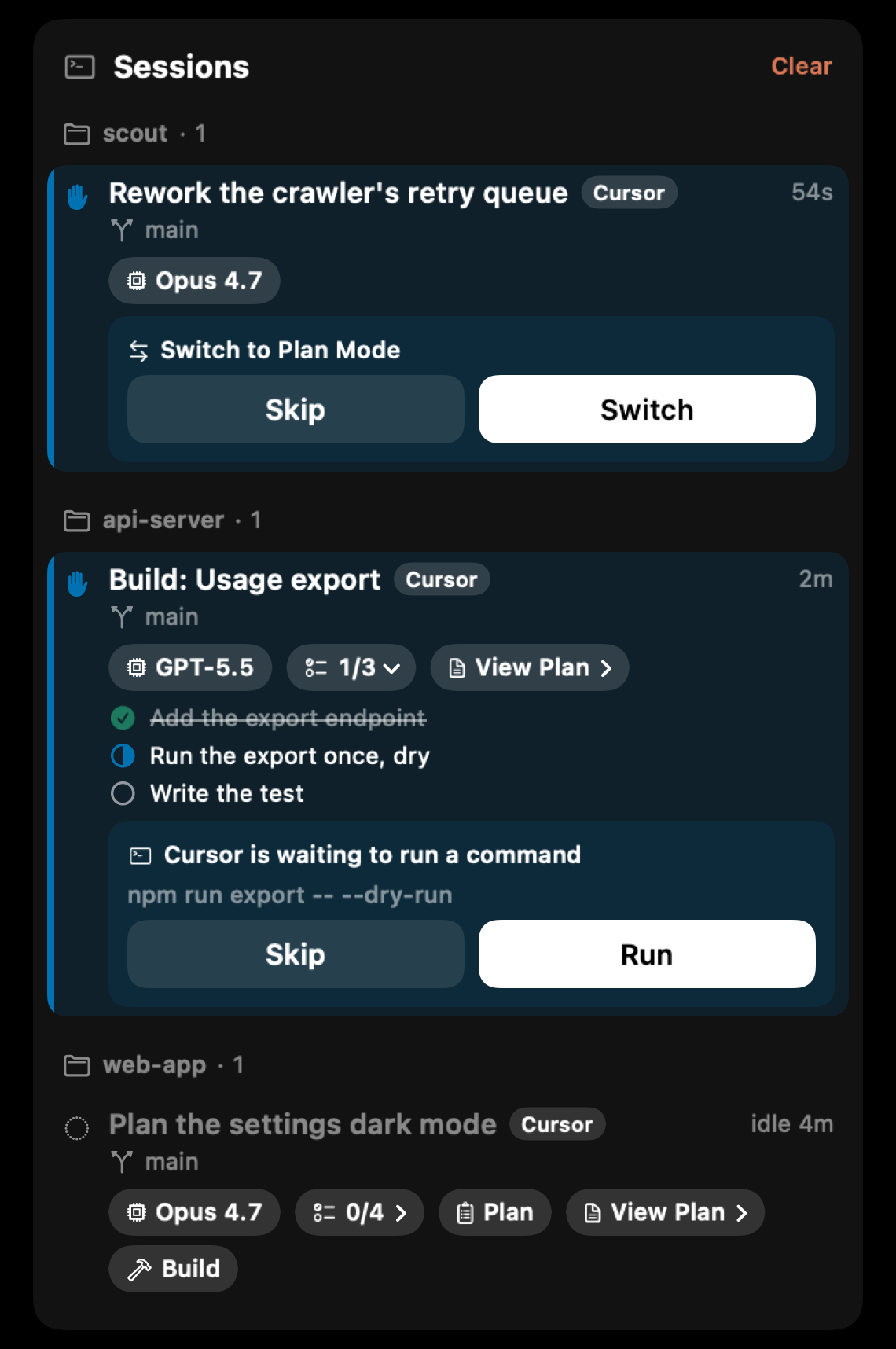
- Plans and approvals: a plan on its chat's row when Cursor creates it, with its to-dos, View Plan and Build; and, with the two switches on Cursor's page in Settings, each shell command held for Allow or Deny in the notch, and Cursor's own Run and switch-mode cards on the row.
- Sessions: with Cursor's hook, every running agent with its title and elapsed time, and a tick on the ring and a refresh the moment a turn ends. Without it, a Cursor CLI (
cursor-agent) session running in a terminal is still listed, marked as found without the hook; the editor's own agents are seen only through the hook.
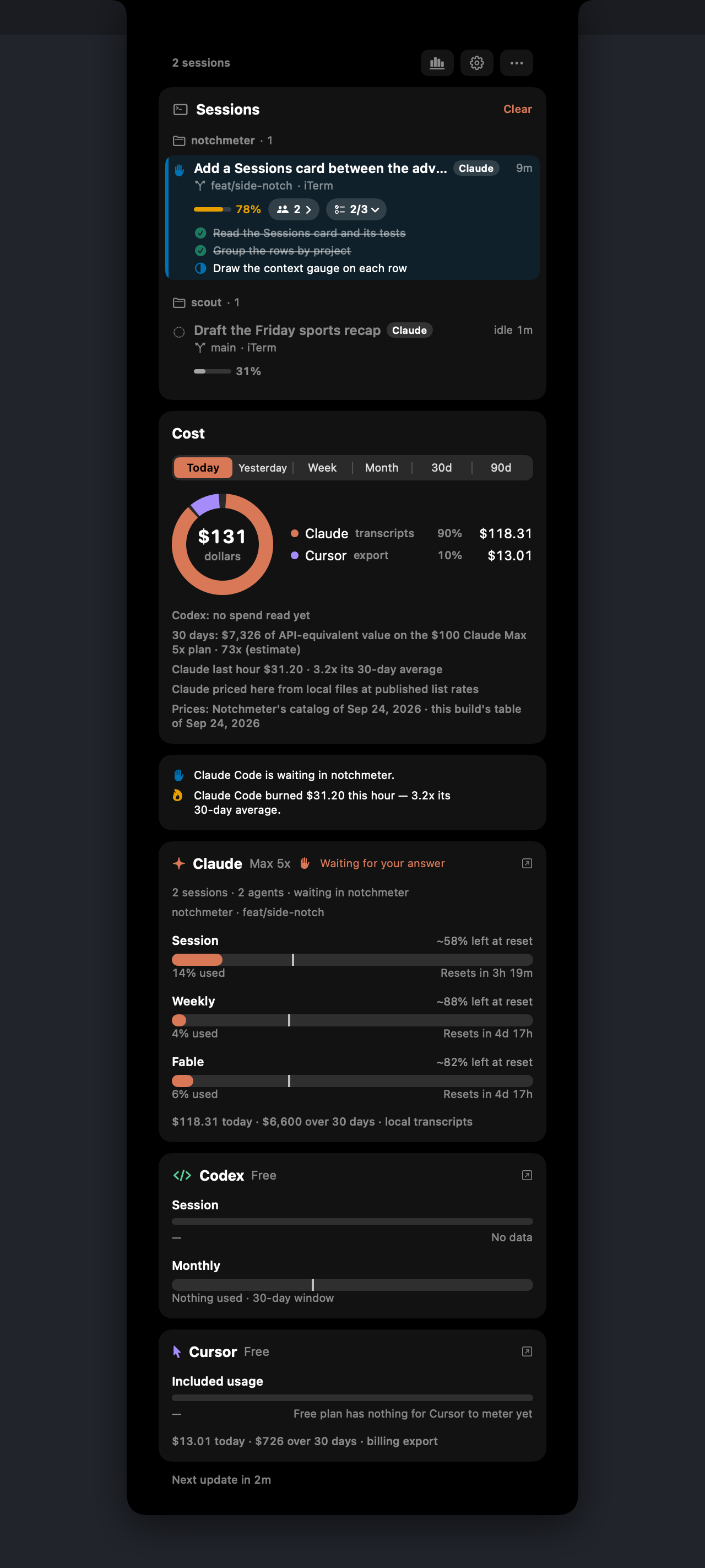
Cursor, answered from the notch
Cursor's hooks report no task list, no plan and no event that says it is waiting for you, so Notchmeter reads the rest from Cursor itself: the plan from the conversation's transcript and the file Cursor keeps in ~/.cursor/plans, and Cursor's own cards from its window.
- A plan on its row when Cursor creates it, before you build it: its to-dos crossed off as they finish, View Plan to read what it is on the row, with Open in Cursor under it, and Build.
- Require notch approval for every command: each shell command and MCP call waits for Allow or Deny in the notch. One nobody answers goes back to Cursor's own prompt, so nothing is allowed for you unanswered.
- Mirror Cursor's cards: when Cursor shows its Run prompt, headed by the command it would run, or its switch-to-Plan-Mode card, the notch opens on it, and the button you pick is pressed in Cursor. A question Cursor asks appears there too: pick a choice and press Continue, as you would in Cursor. An answer you type is still given in Cursor. A question asked while Cursor's window is minimised or hidden still reaches the notch, shown with a button that brings Cursor back to answer it. It needs the Accessibility permission, and Cursor's editor shows Screen Reader Optimized while it is on unless you turn that off in Cursor's settings.
- May be stuck: a chat in which five commands fail in a row, with no command working and no edit landing between them, says so on its row.
Both switches are off until you turn them on.
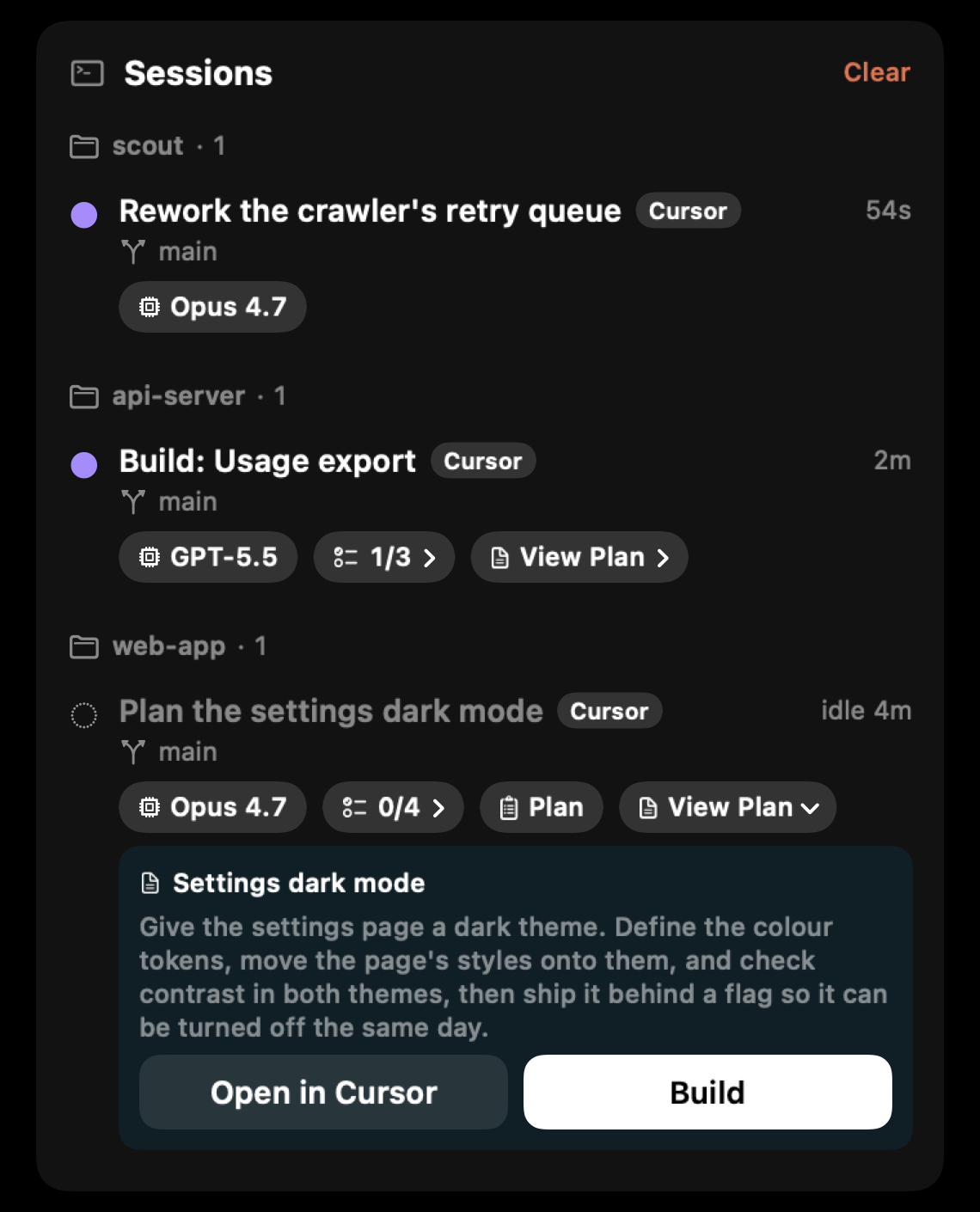
A plan you can read where you are
View Plan shows the plan on its chat's row: its name and Cursor's own summary of it, or the plan's first paragraph where it has none, read from the plan file when you open it and kept only while it is open. Open in Cursor takes you to the plan itself and closes the notch, and Build is beside it while the plan is ready to build.
With Show what a session is working on off, or with Hide usage while the screen is shared or recorded on while it is, a plan's words stay out of the notch and View Plan goes straight to Cursor.
Where each figure comes from
Every window is one of cursor.com's own figures; the source is named on the card.
| Figure | Source | Notes |
|---|---|---|
| Included usage, On-demand, Team pooled, Cursor models, Other models | GET https://cursor.com/api/usage-summary (falling back to /api/usage on a request-metered plan, whose figure is Fast requests) | Undocumented dashboard endpoints; their shapes were taken from cursor.com's own traffic and are pinned by tests. |
| The cycle figures | POST /api/dashboard/get-current-period-usage, asked only on a seat the summary meters nothing for | The included ring is includedSpend / limit in cents, never Cursor's percentage fields. |
| Grok Bot | POST /api/dashboard/get-sand-usage-status | A window only where the seat has the allowance or a live trial; an expired trial is no window, never an empty bar. |
| Cost | POST /api/dashboard/get-filtered-usage-events: the last 30 days of usage events with Cursor's own cost on each. On by default; Also read Cursor's usage events switches it off | Day resolution, so Cursor reports no hour and never appears in a burn line; days older than 30 come from Notchmeter's own daily history, so the 90-day range is short until it has run that long. |
| Sessions | Cursor's hooks, through the optional hook command; without them, the Cursor CLI's sessions running in a terminal, each marked as found without the hook | Cursor documents no event that waits for you, so its ring shows a wait only as a possible one: a turn quiet for 45 seconds with no command running, worded “may be” because it is Notchmeter's inference. |
The login is the editor's own access token in ~/Library/Application Support/Cursor/User/globalStorage/state.vscdb, sent to cursor.com as the WorkosCursorSessionToken cookie, the form the dashboard sends it in, with User-Agent: Notchmeter/<version> and, on the POSTs, the Origin: https://cursor.com the dashboard's own requests carry. It is read, never refreshed or stored.
When cursor.com answers the same question twice, the window is as spent as its furthest-along figure says: an Enterprise seat once read 55% by one field while the other said the whole allowance was gone, and the billing export showed on-demand charges in that same cycle. Under-reporting a spent window hides a meter that is charging money, which is the one thing this app exists to catch, so the other way to be wrong is the one chosen (When a vendor publishes two figures for one window).
Cursor's Terms of Service (effective 2026-09-03, read 2026-09-24) list “harvest, scrape, or extract data from the Service” among the things a user may not do. These are the dashboard's own reads of your own usage, made by a program rather than the browser; whether the clause reaches them is Cursor's to say, and if Cursor asks the project to stop, the meter is removed in the next release (If a vendor asks us to stop).
What it says to do about it
The Advice strip's lines for Cursor. Its main window is the billing cycle.
Questions
Which Cursor plans does it meter?
Any seat signed into the Cursor editor on this Mac: a Pro or Ultra seat's included usage and on-demand spend, a Teams plan's pool, an Enterprise seat including one billed on-demand (its cycle figures, or Today's spend where nothing is metered), and a request-metered legacy plan's fast requests. A free plan has nothing for Cursor to meter, and the card says exactly that rather than drawing an empty bar.
Why does the meter disagree with the percentage on cursor.com?
Because the ring is drawn from dollars, not from Cursor's percentage fields. Cursor staff have said those fields “reflect a different internal metric” and are “not calculated as a simple totalSpend / limit” (forum thread 168210, 2026-08-13), and between 2026-08-11 and 2026-08-17 they froze backend-side while the cents kept counting. The included ring is includedSpend over limit, the dollars are printed as the summary gave them, and where two figures disagree the window is as spent as the further-along one says. The reasoning is in docs/accuracy.md.
Does Notchmeter price my Cursor usage?
No. Every dollar on the Cursor row is the one Cursor itself put on that event in its usage export, which is why the row's source reads “billing export” rather than an estimate. A request or a model Cursor left unpriced stays unpriced. The export is day resolution and reaches back 30 days; anything older is what Notchmeter's own daily history has accumulated since it was installed.
Does it show when Cursor is waiting for me?
By default, only as a maybe. Cursor's hooks document no event that means the agent is asking you, so the Cursor ring shows the tick when a turn ends and the session count, and the waiting dot only for a possible wait: a turn that goes 45 seconds without activity and with no command running, worded “may be” because it is Notchmeter's inference rather than a Cursor event. Two switches on Cursor's page in Settings, both off until you turn them on, make a command's wait certain and let you answer it: Require notch approval holds every shell command and MCP call for Allow or Deny in the notch, and Mirror Cursor's cards shows Cursor's own Run prompt and its switch-to-Plan-Mode card on the session's row and presses the button you pick.
Does it sign into Cursor or store my token?
No. It reads the access token the editor already keeps in its state database and sends it only to cursor.com, as the cookie the dashboard sends it in, in the same reads the dashboard makes. It is never refreshed, stored or forwarded, and switching it off under Settings › Assistants stops every request to cursor.com at once.
Is reading the dashboard endpoints allowed by Cursor's terms?
Cursor's Terms of Service (effective 2026-09-03, read 2026-09-24) forbid harvesting, scraping or extracting data from the Service. These are the dashboard's own reads of your own usage, made by a program rather than the browser; whether the clause reaches them is Cursor's to say. The commitment is written down: if Cursor asks the project to stop, the meter is removed in the next release, and the release notes say so. See docs/privacy.md.
Install it
macOS 15 Sequoia or later, Apple silicon or Intel. Signed, notarised, and it updates itself. Free forever, MIT licensed.
Notchmeter is a Mac app. There is no Windows or Linux version; if you want a Windows one, the Windows issue is where to say so. How every figure is built, with its source and its date: docs/accuracy.md.