
Will you run out before the window resets?
A percentage says how much is gone. It does not say whether the rest will last. Here are the three ways Notchmeter answers that question, from the weakest evidence to the strongest, and the things that can still make the answer wrong.
The short answer
Compare how much is used with how much of the window has gone by. 62% used three days into a seven-day week runs out about two days early at the same rate; 62% used six days in is comfortably fine. Notchmeter draws that comparison as a pace tick on every meter whose window has a known length and reset, and projects it to the reset. Once it has a day of your own history, it projects a week at how far the week rose over the last day, nights and breaks included, and the five-hour session at the pace of the hours you worked in it, as a range from your slower hours to your faster ones.
Pace, not percentage
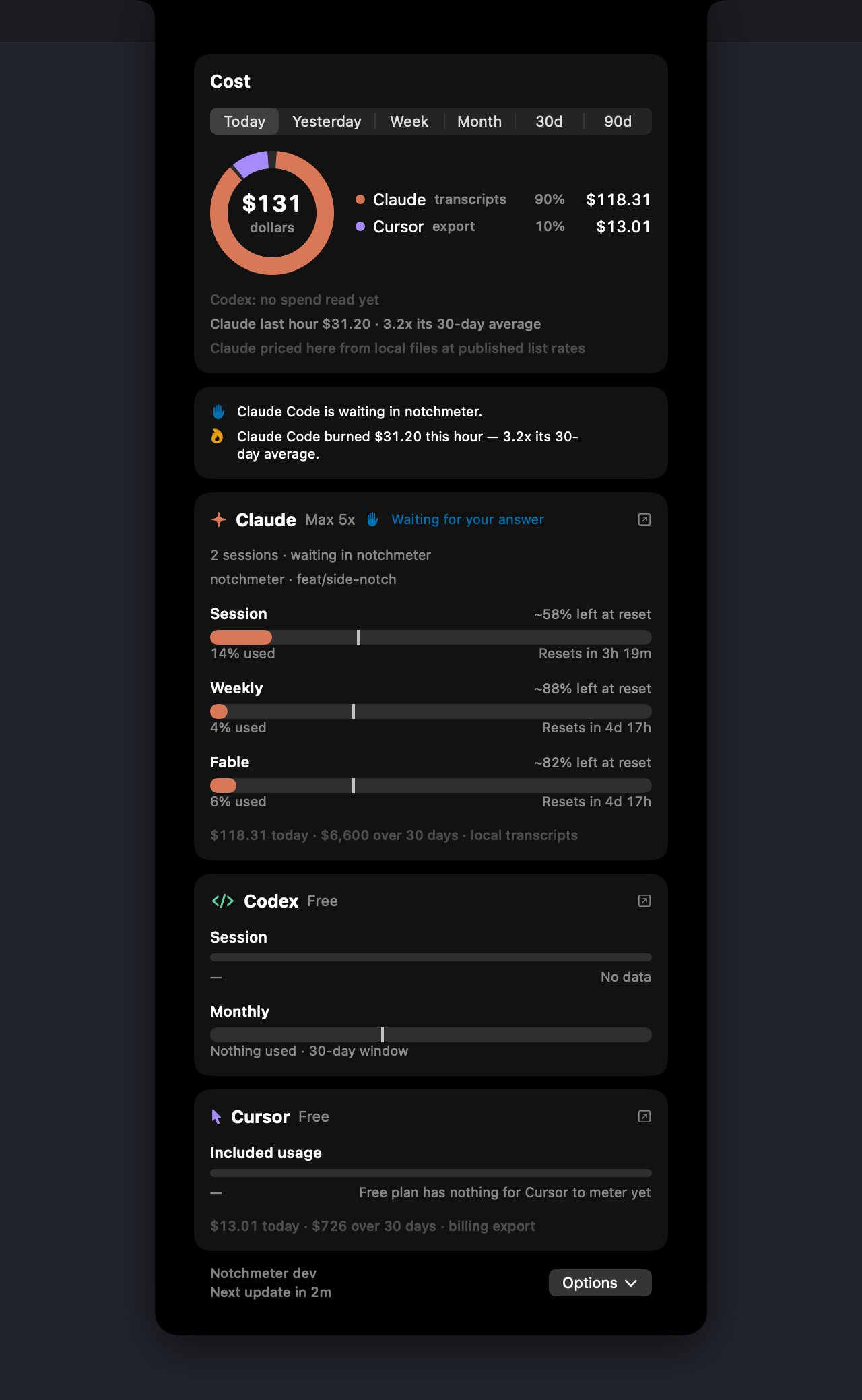
Every meter whose window has a known length and reset carries a tick at the point an even burn would have reached by now (the few that do not are listed below). The fill against the tick is the whole question: fill short of the tick is room, fill past it is borrowing from later. The projection beside the meter carries the same arithmetic to the reset, and the window gets one of three states.
| Used | Time gone | Projected at the reset | State | What the meter says |
|---|---|---|---|---|
| 62% | 6 of 7 days | 72% | Ahead: lands with at least 10% to spare | ~28% left at reset |
| 85% | 6 of 7 days | 99% | On track: lands inside the last 10% | ~1% left at reset |
| 62% | 3 of 7 days | 145% | Behind: runs out before the reset | Runs out in 1d 20h |
The third row runs out a little over two days before its reset. A 62% on its own would have looked like the first row. Nothing is projected until at least a minute and 1% of the window have gone by, because a rate measured over seconds is noise; and a window nobody has touched gets no note at all, since "100% left at reset" tells you nothing the meter does not.
Three answers, and which window gets which
1. The even burn
The projection above assumes the rest of the window goes the way the part so far went. It needs nothing but the vendor's figure, the reset and the window's length, so it is available from the first read, and the tick on the meter always shows it. Its weakness is obvious: a morning of heavy work followed by an afternoon off looks, at noon, like a week that will run out. So it is only the answer until the log below has something better.
2. A day's rise, for a week or a month
Notchmeter keeps a small log of every successful read: the time, the window, the used fraction and the reset, never a token, for seven days. Once the log reaches back a day, a window of a day or longer is projected at how far it rose over that day, nights and breaks included. The rise is the growth of the window's highest figure, so a figure that flickers a point either way between two reads counts once, and a reset inside the day starts the new week from nothing. That one projection colours the ring, writes the note beside the meter, words the advice and decides the notifications, so none of them can disagree. It answers "if the next days go like the last one", which is the question a week asks.
It replaced the pace of the hours you worked, which answered "if you work without stopping from now". On 27 September that told a reader at 9 AM that a week spent mostly on the night it reset, and barely touched in the two days since, would run out that afternoon.
3. The pace of your working hours, for the session
A five-hour window is spent while you work, so it is projected at the pace of the hours it was used in. A meter that moved gets a line such as 12% → 61% in the last hour, and the last hour's measured rate replaces the even burn in the projection and the notifications. It answers "at the rate I am going right now", which is the right question in the middle of a heavy job.
With enough history the log answers with two times instead of one. Every rise of the window in the last seven days gives a rate: the rise over the time since it last rose, when that was between five minutes and an hour before, so a figure that moves in whole points is not mistaken for a sprint and a break is not counted as work. The 20th percentile of those rates gives the latest run-out, the 80th the earliest. At least four rates are needed; fewer and there is no interval.
- When the two edges are more than fifteen minutes apart, the card shows a range: Runs out 2:10 PM–4:40 PM.
- When they are closer than that, one time, their midpoint, because neither edge is the better guess inside a quarter of an hour.
- When only the fast edge falls before the reset: Runs out from 2:10 PM, or lasts to the reset. The advice line names that same time, so the panel never gives two times for one event.
The interval is a description of your own recent hours, not a model of how the vendor meters. Notifications fire on its earliest edge, because a warning is a threshold and should come early.
Peak hours
Anthropic applies tighter session limits on weekdays between 05:00 and 11:00 Pacific. That window is reporting, not documentation: The Register described it on 2026-03-26 from Anthropic's announcement, and Anthropic's support article on usage limits does not publish the hours. So in Notchmeter it is a setting you can edit or turn off: the hours under Settings › Advanced › Peak hours, and which assistants they apply to with the Peak hours switch under Rings and windows on each assistant's page. It starts on for Claude only, and off for every other vendor because none has announced one.
Inside the window, the session projection assumes the peak rate the log has observed, and the panel says so: Peak hours until 11:00 AM: the session projection assumes the peak rate. Within an hour of the end it turns into advice about timing: Off-peak in 1h 20m: start the long job then. And the run-out interval keeps peak and off-peak hours apart once it has at least four rates on each side.
Being told before it happens
Notifications fire when a window's pace crosses a line, not when a percentage does, because an alert at 90% arrives when it is too late to change anything. Each has its own switch under Settings › Notifications.
- Cutting it close (on track). Passive: no sound, no banner over a full-screen app.
- Will run out (behind pace). Active.
- Almost out (under an hour left), and out. Time-sensitive, with a sound if you allow it.
Each is sent once per window per reset period, a calmer state is never announced, and none is sent in the first tenth of a window, when the projection is still noise. A limit actually hit is a measurement rather than a projection, so it is reported the moment it is seen. Inside your quiet hours these are delivered silently to Notification Center rather than dropped, because a stage that never repeats would otherwise be one you were never told about.
When it has run out
With the Claude Code hook installed, a turn that stops on a rate limit moves the ring to Limit hit at once rather than at the next poll, and the advice names the reset: Claude Code hit its limit; session resets in 2h. Whether to wait or move depends on what else has room. When the window resets within the hour and no other assistant on a paid plan has half its main window left, the advice is to wait: Claude session resets in 40m; wait rather than switch. When something else does have room, it says which (the routing guide has the rules).
One line is deliberately hedged. When the Claude session window was the one hit and the week still has 40% left, a quieter line mentions /limit-reset, a command users report clears the 5-hour window but not the weekly cap. It is community-sourced and was not in Anthropic's documentation when the rule was written (2026-09-20), and the line says "may" for that reason.
What can still make the forecast wrong
- A long job just started. A week is projected at the last day's pace, so a job begun this morning shows in the projection as its hours go by, not before it starts. The session's own projection, at the pace of your working hours, is the one that answers for the next few hours.
- Other machines. The vendor's used fraction is the whole account's. Work on another Mac or on claude.ai drains the same window, and the log sees the figure move without seeing why.
- The metering itself moves. Anthropic meters the session window in something other than tokens, and the same work can cost a different share on different days. Notchmeter records how many of this Mac's tokens made 1% of the session each day, and when today's figure is half the 30-day median or less it says so: The session is metering about 2.1x heavier than your norm. It needs five days to compare against, and a gap of six times or more is not called heavier metering at all, because another machine explains that far better.
- The 2026-09-14 weekly-cap change. Anthropic changed what the weekly window measures on that date while the percentage kept reading the same. The log marks the boundary, and the metering norm starts after it.
- Windows with no declared length or reset. Google declares no length for Gemini CLI's per-model buckets, so those meters carry no pace tick or projection until it does. Antigravity's session and weekly groups do declare theirs. OpenCode Go publishes no reading at all, so its 5-hour, 7-day and 31-day meters are computed on this Mac from your own turns, over trailing windows, and since Go does not say when its windows start they claim no reset and draw no pace tick; they can read high, never low.
- A Claude reading that has paused. Claude Code renews its login only when
clauderuns in that Mac account, so in an account where it rarely runs, Notchmeter's Claude reading pauses. The card keeps the last reading, with one grey line saying how old it is and what renews it; Notchmeter never renews the login itself. - Comparisons are not limits. Cursor's Today's spend, shown on a seat Cursor meters nothing for, is today's dollars against your usual day. It paces, but it never runs out, warns or notifies.
Asking before a long job
The notchmeter command (Settings › General › Install command line tool…) exits with 10 when any window is at 80% or behind pace and 11 when one is at 100%, so a script can check before it starts. notchmeter claude --json carries each window's pace, projectedFraction and drainLastHour, and the Claude Code plugin's skill reads the same object so Claude checks its own windows before long work without being asked.
Sources
- docs/accuracy.md: the run-out interval, peak hours, session metering and the weekly-cap boundary, each with the tests that pin it.
- docs/features.md: the advice rules and the notification stages.
- The Register, 2026-03-26, on Anthropic's peak-hour session limits, as cited in the accuracy document; Anthropic's own support article does not publish the hours.