
Know which assistant is waiting,
and whether you can afford the next task.
Every figure sourced, dated and tested — here is the document: docs/accuracy.md.
Usage meters for Claude Code, Codex, Cursor, Gemini CLI, Antigravity, Copilot, Kimi Code and OpenCode, and the sessions they are running, living in the MacBook notch or on any screen edge you prefer. Your menu bar ran out of room three apps ago. This one doesn't take any.
Answer Claude Code from the notch: approve or deny a permission request, pick the answer to a question, and jump back to the terminal it came from. Each part has its own switch in Settings; docs/hooks.md says what the hook sends and how it fails open.
macOS 15 or later · Apple silicon or Intel · no account, ever

Claude Code, Codex, Cursor, Gemini CLI, Antigravity, Copilot, Kimi Code and OpenCode, on one strip.
No account, no token stored, nothing sent to a server of ours.
Measured under a heavy job. Nothing at all while the screen is locked.
MIT licensed. Build it yourself if you'd rather.
Every other meter tells you how much
Notchmeter also tells you what to do about it. The rules are pure functions, run over every visible tool's live reading, and each one is worded as an instruction rather than a percentage.
The whole picture, on hover
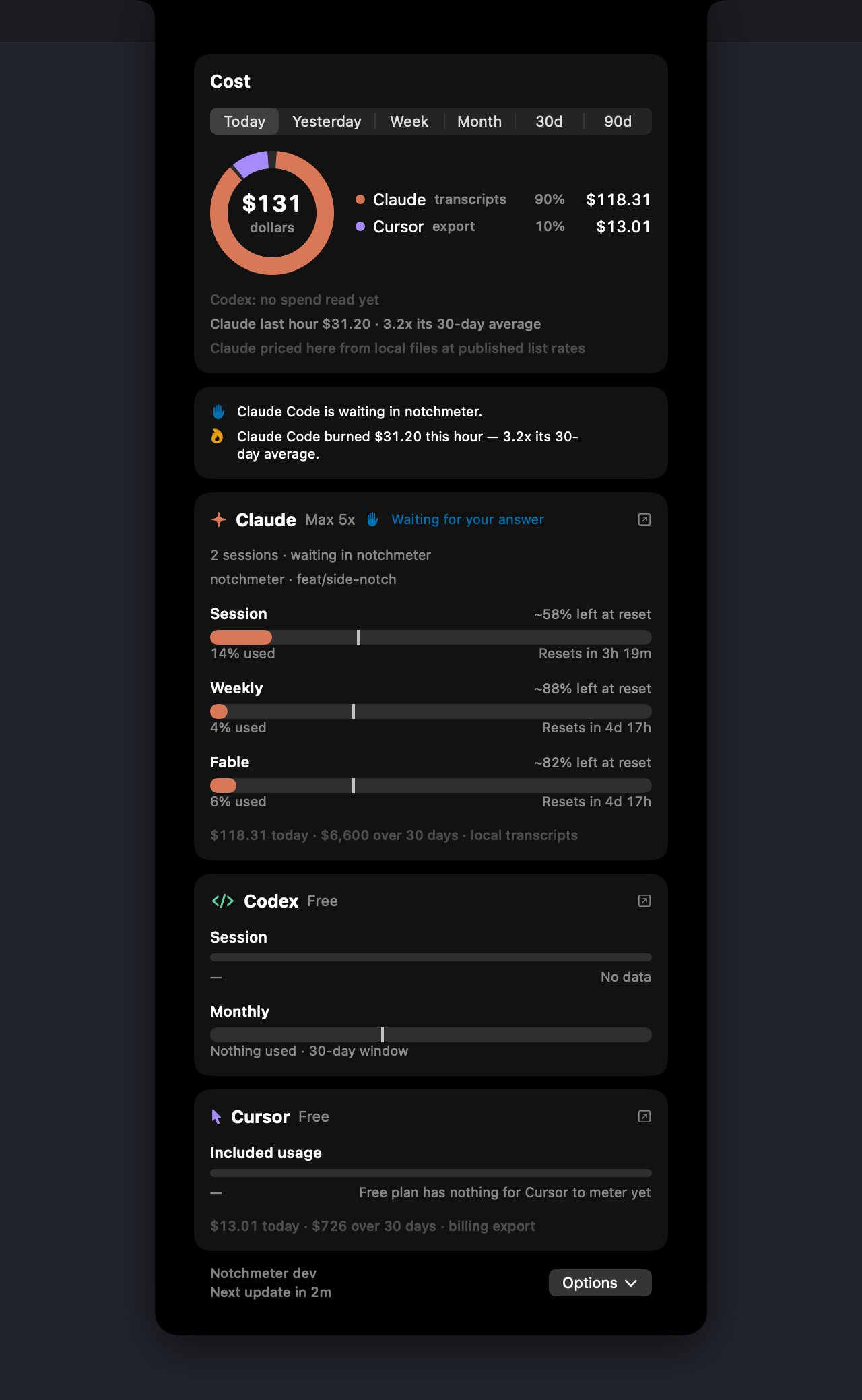
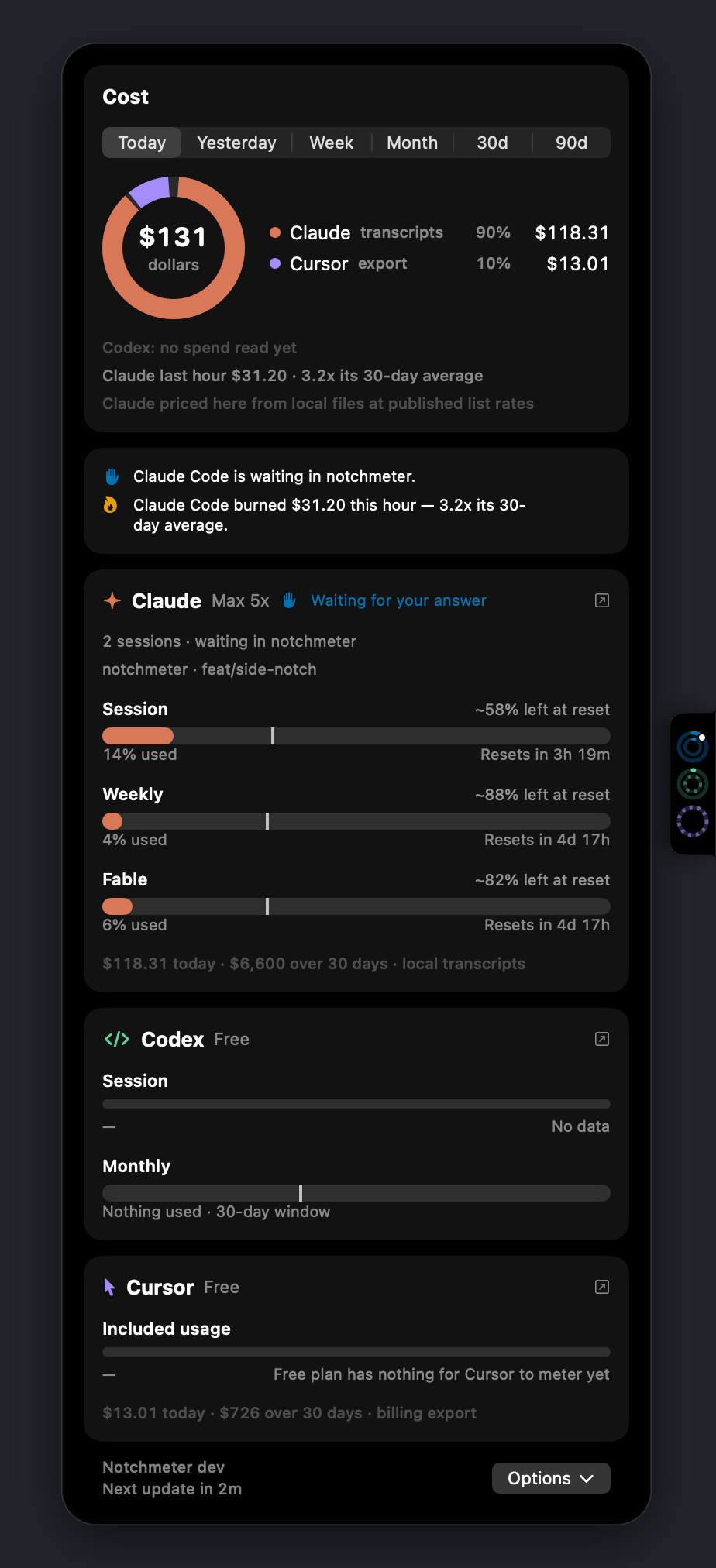
Every meter shows a pace tick — where an even burn would be right now — a projection (“~67% left at reset”, or “Runs out in 2h”), and the reset time as a countdown or an exact time.
The Cost card adds what your local Claude Code sessions would have cost at API list prices: today, yesterday, this week, this month and the last 30 and 90 days, with a 30-day trend, split by model and by project.
A dashboard, so you are not guessing
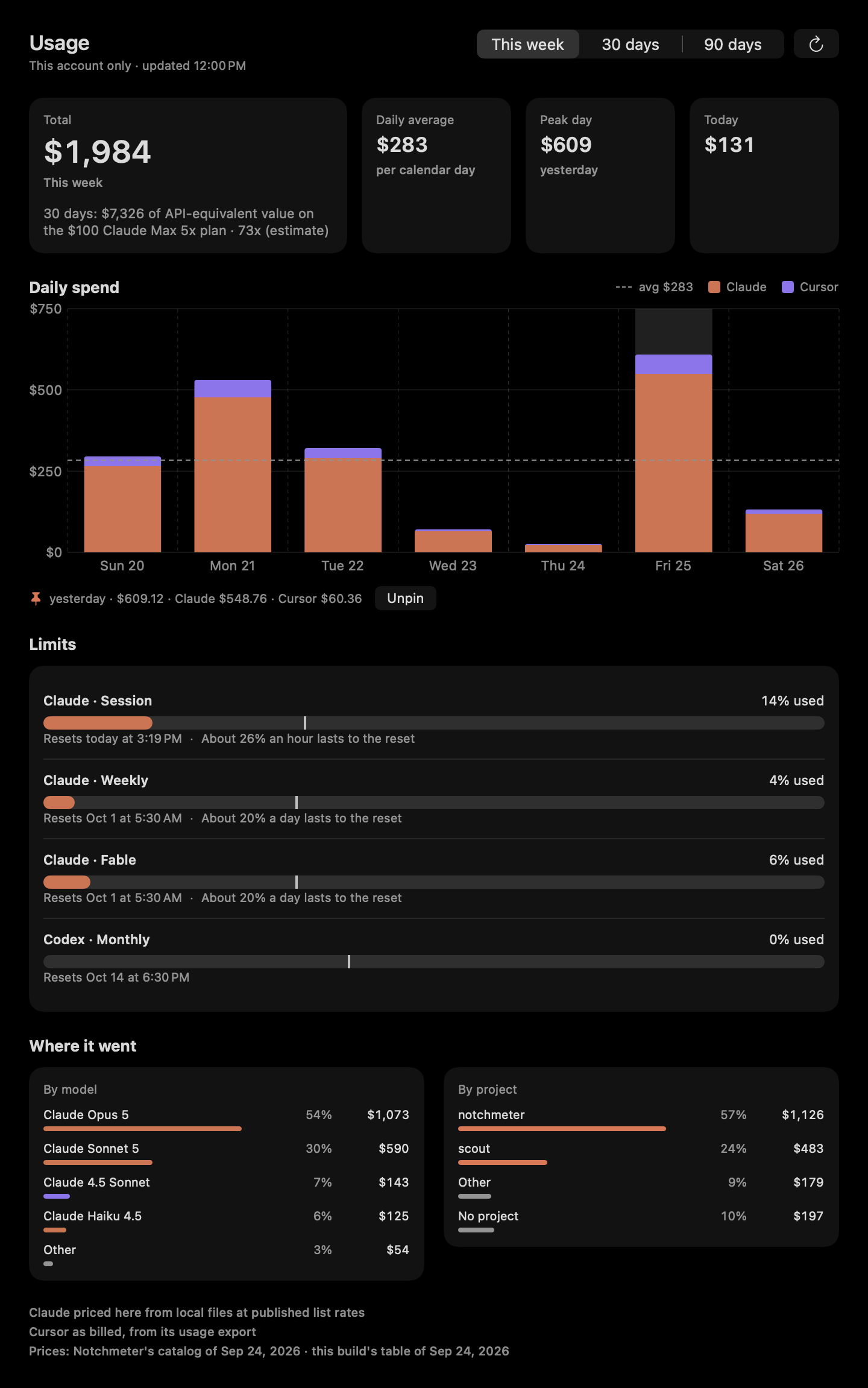
Press ⌘U for the week in one window: the total first, what you spent each day and on which assistant, the peak day, and every limit on the panel's own meter with how much a day lasts until it resets.
Rest the pointer on a day for its figures, and click days to pin them side by side under the chart. Switch to 30 or 90 days to see the trend, and where the money went by model, in each assistant's colour, and by project, in the accent you chose for the panel. It reads only this Mac account's own figures and sends nothing anywhere.
Read from the tool that owns the account
Each reading is borrowed from the assistant itself, on the login that assistant already keeps on your Mac. Switch accounts in the tool and the notch follows.
Claude Code
The 5-hour session window, the weekly window, and the per-model weekly limits Anthropic publishes — plus what your local sessions would have cost at API list prices.
Codex
The session, weekly or monthly rate-limit windows from the same backend Codex itself asks, with the snapshots Codex writes into session rollouts as a fallback when offline.
Cursor
Included plan usage and on-demand spend for the current billing cycle, read the way cursor.com's own dashboard reads it, plus the Grok Bot weekly allowance where a seat has one. On a seat billed on-demand, the dashboard's own cycle figures fill the ring; with none, today's spend against your usual day.
Gemini CLI
The per-model quota Google meters for Gemini CLI — Gemini Pro, Flash, Flash Lite, and any Claude or GPT model the plan covers — from the same Code Assist endpoints Gemini CLI's /stats reads, asked as Gemini CLI.
Antigravity
The session and weekly quota Antigravity's own panel shows for its model groups, asked as Antigravity, so it can differ from Gemini CLI's on the same Google account.
GitHub Copilot
The AI-credit allowance for the month on a seat GitHub bills by usage (the premium-request allowance on a legacy one), and the chat and completion quotas when a plan meters them, from the endpoint Copilot's own editor plugin asks; the credits used, a cent each, join the Cost card.
Kimi Code
The rolling five-hour window, the week and the monthly pools, from the endpoint Kimi Code's own /usage command reads. Where Kimi's two kinds of figure disagree about a window, the window is as spent as the furthest-along one says.
OpenCode
The OpenCode Go meter, computed on this Mac from OpenCode's own database at the Go page's published rates and limits, its spend on the Cost card and its sessions, with no request to anyone.
Every assistant's plan, crossed off as it goes
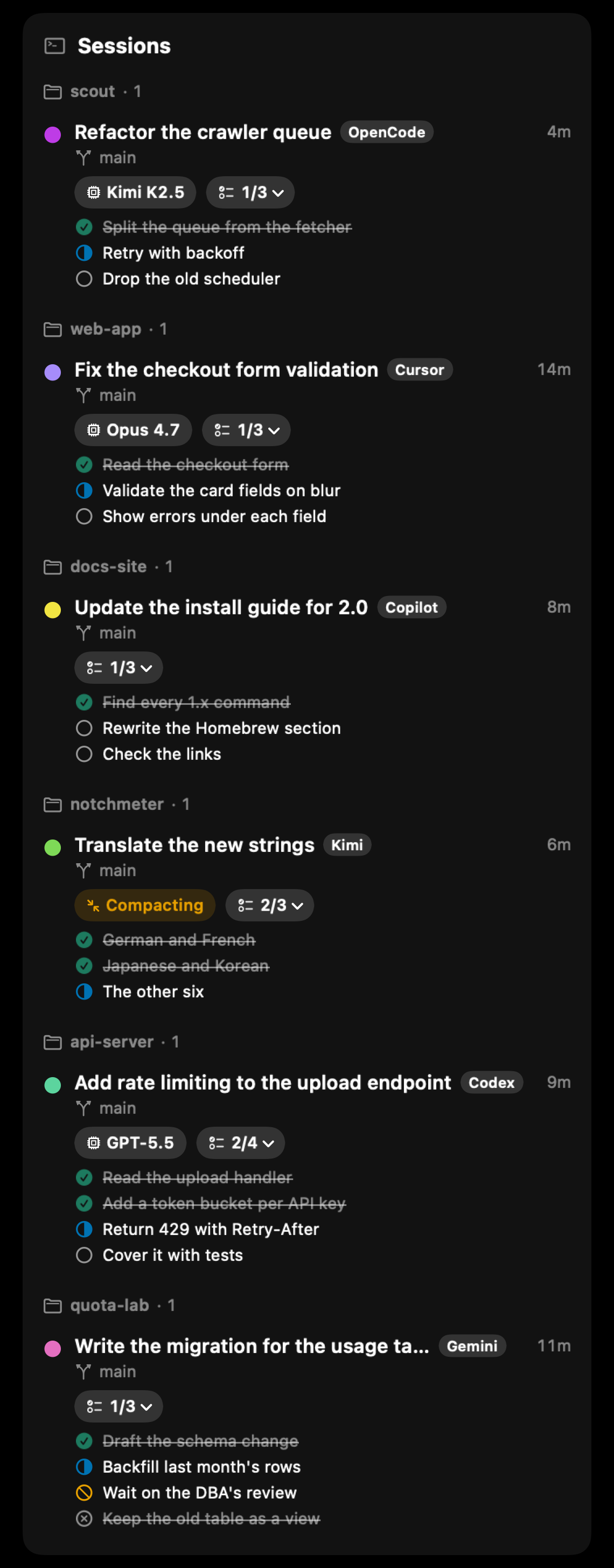
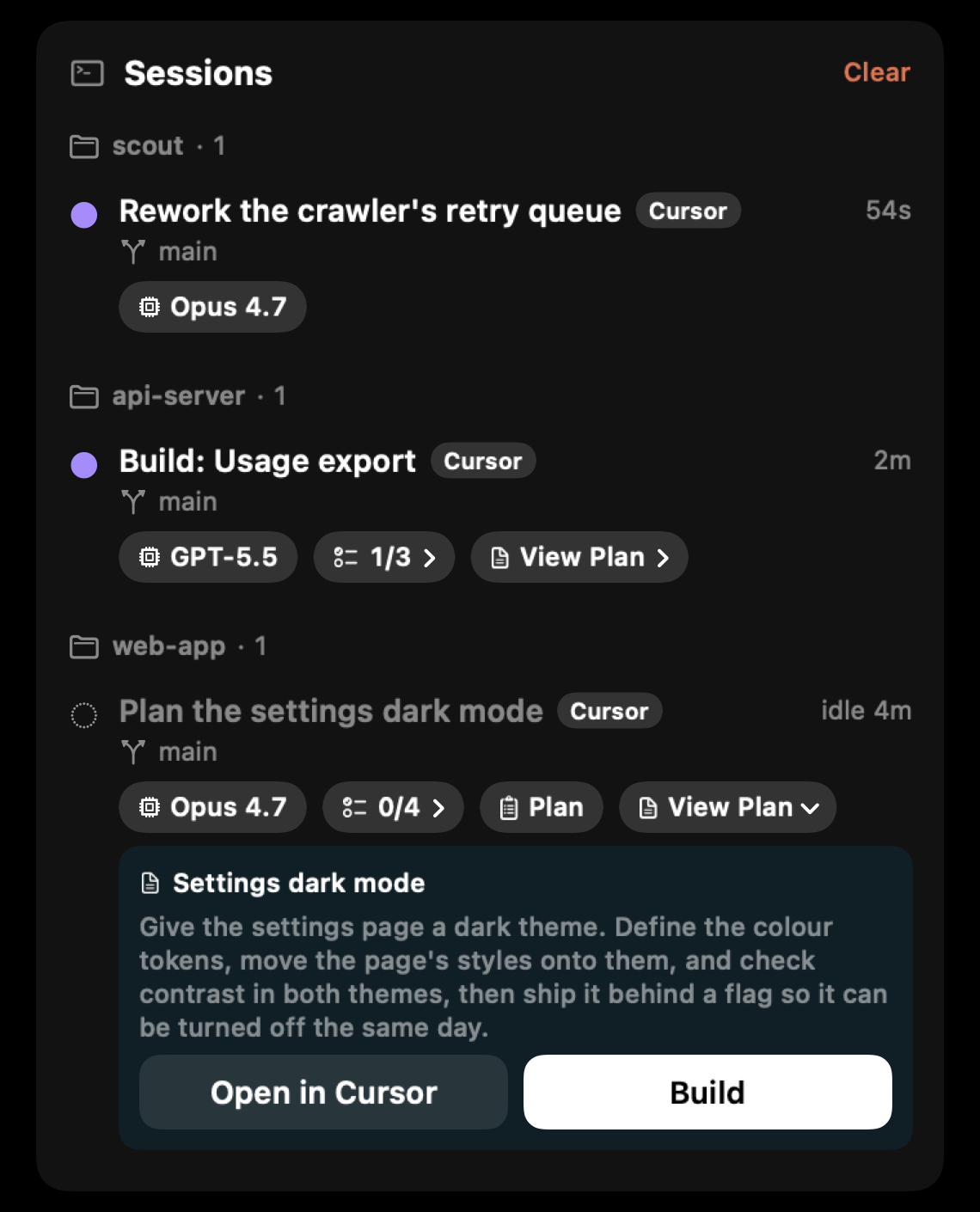
When an assistant keeps a task list, its row says how far along it is, 2/4, and opens to the list: finished steps crossed off, the one in progress half filled. Claude Code, Codex, Gemini CLI, Kimi Code, GitHub Copilot and OpenCode report theirs through the hook or plugin. Cursor's hooks never report its to-do list, so Notchmeter reads it from the conversation's own transcript instead, with nothing to set up.
A step that's blocked gets a mark of its own, and a cancelled step stays on the list, crossed out in grey and left out of the count. The row also shows the model the session runs on, written the way you'd say it (GPT-5.5, Opus 4.7), and a Compacting mark while the assistant summarises its context, wherever it reports either.
The hook is optional. Claude Code, Codex, Cursor, Gemini CLI, GitHub Copilot CLI and Kimi Code each have one, and OpenCode has a plugin; with it, the notch refreshes the moment a turn ends and knows each session's state as it changes. Without one, the sessions running in your terminals are still listed, each marked as found without it.
Cursor, answered from the notch
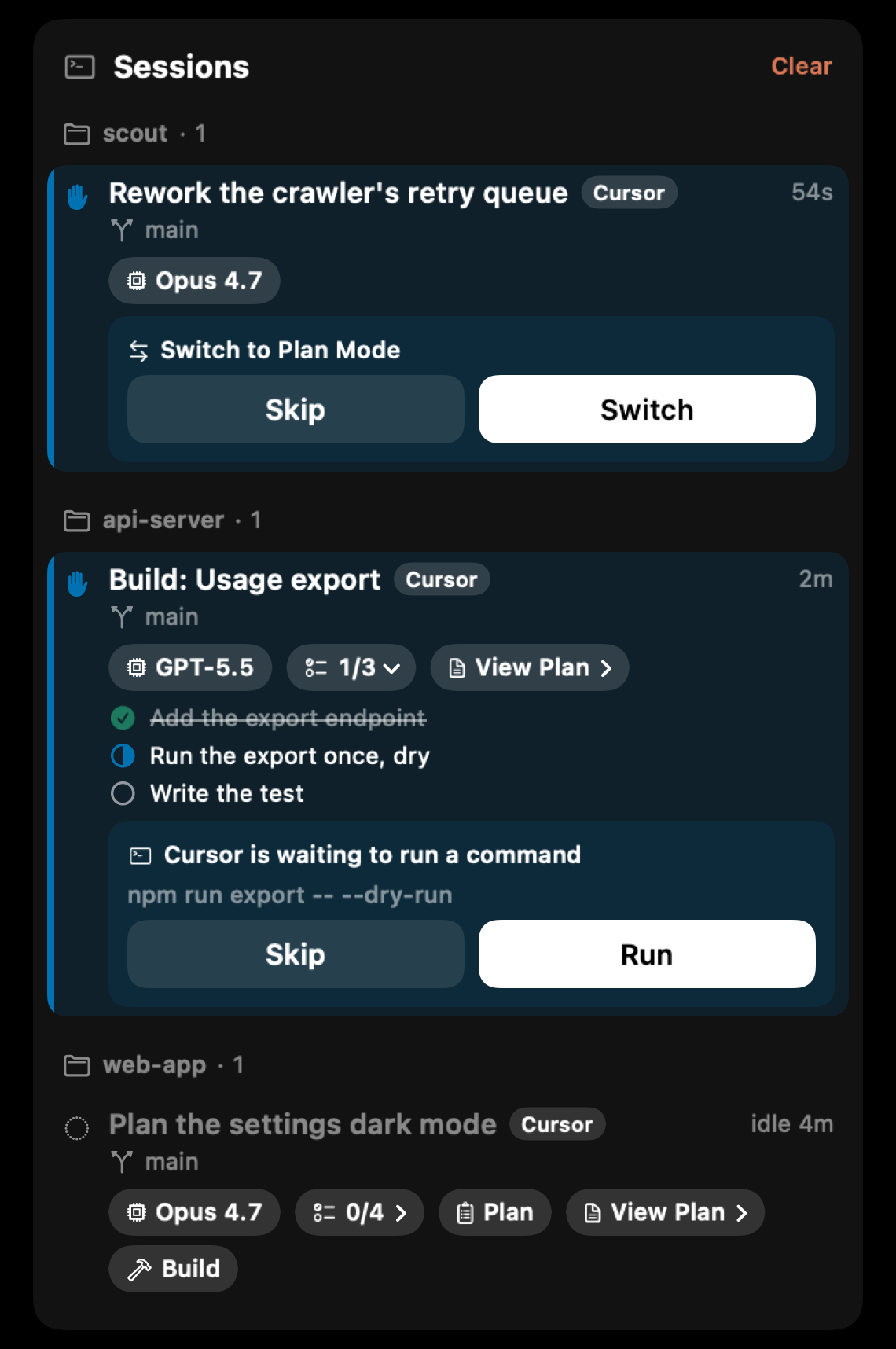
Cursor works differently from the other assistants. Its hooks report no task list, no plan and no event that says it is waiting for you, so Notchmeter reads the rest from Cursor itself. A plan appears on its chat's row when Cursor creates it, before it is built, with its to-dos, View Plan and Build, and the turn that builds it is named for the plan.
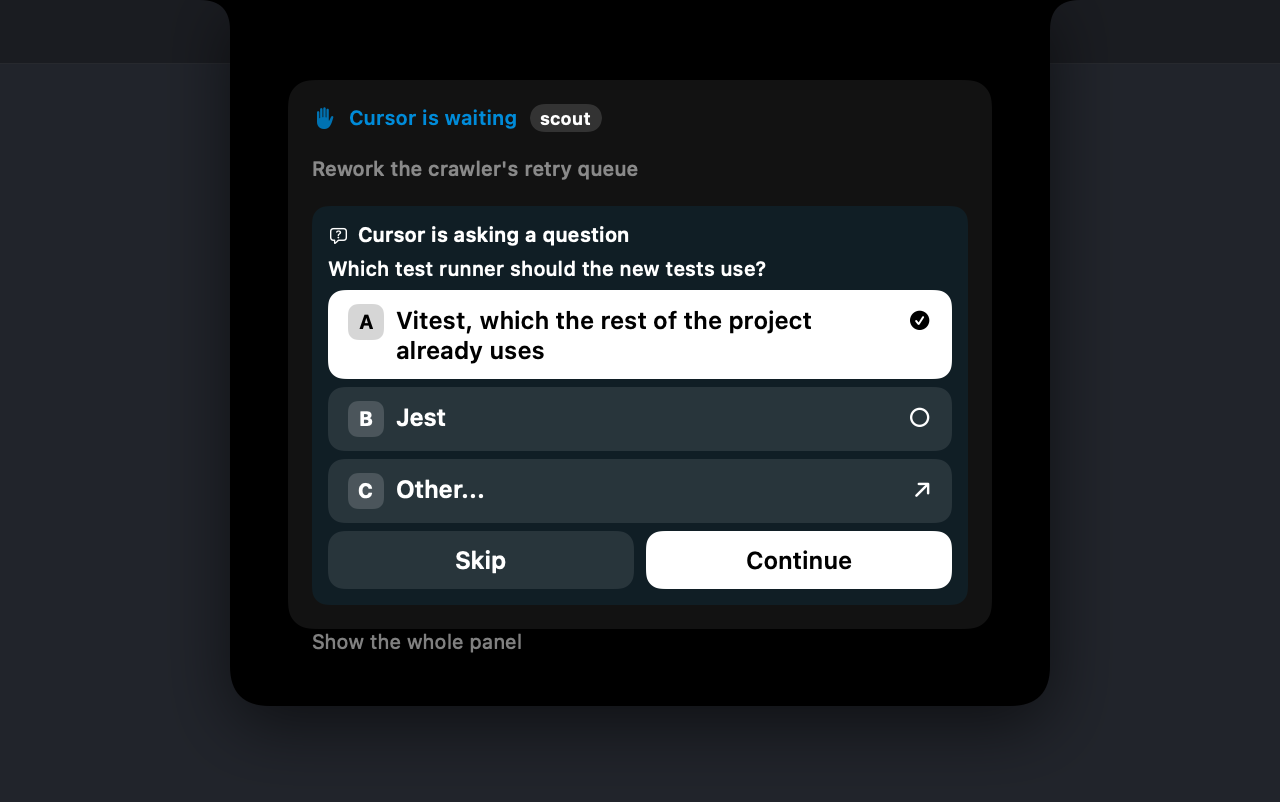
Two switches on Cursor's page in Settings, both off until you turn them on, let you answer it. Require notch approval for every command holds each shell command and MCP call for Allow or Deny in the notch; one nobody answers goes back to Cursor's own prompt, so nothing is allowed for you unanswered. Mirror Cursor's cards opens the notch on Cursor's own Run prompt and its switch-to-Plan-Mode card, in Cursor's words, and presses the button you pick in Cursor. A question Cursor asks is answered there too: pick a choice and press Continue, as in Cursor. One asked while Cursor's window is minimised or hidden still reaches the notch, shown with a button that brings Cursor back to answer it. A chat whose commands keep failing says May be stuck.
The mirror reads Cursor's windows through the Accessibility permission, never the screen, while a Cursor chat is in a turn and when you press Build. While it is on, Cursor's editor shows Screen Reader Optimized unless you turn that off in Cursor's settings.
Read a plan without leaving the notch
View Plan shows a Cursor plan on its chat's row: its name and the summary Cursor wrote for it, or the plan's first paragraph where it wrote none, read from the plan file when you open it and kept only while it is open. Open in Cursor under it takes you to the plan itself and closes the notch, and Build sits beside it while the plan is ready to build.
With Show what a session is working on off, or with Hide usage while the screen is shared or recorded on while it is, a plan's words stay out of the notch and View Plan goes straight to Cursor.
It says when an assistant wants you
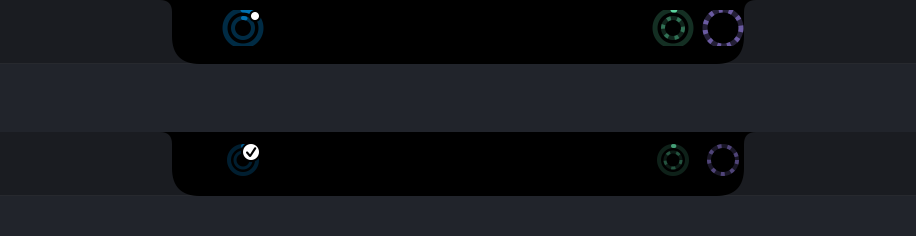
When Claude Code stops for a permission prompt or a question, the rings take the blue that means needs you, not running out, and a white dot says which readout it is — with a count when more than one session is waiting. A turn ending gets the same blue and a tick, for ninety seconds, on every ring with a hook. Claude Code, Codex, Gemini CLI, Copilot and OpenCode report a wait, because each documents an event that means the agent is asking you. Kimi Code documents none, so its ring never claims one. Cursor has no hook event for a wait either, so its ring shows the tick, and a turn gone quiet for 45 seconds with nothing running as a wait worded may be, rather than claiming one it cannot see; with either of Cursor's two switches on, a held command or one of Cursor's own cards is a wait it can see, and says so.
Colour is never the only carrier. The dot and the tick stay if you turn the colour off, the cap on a ring's end keeps saying a window is nearly gone, and every readout has a VoiceOver label.
The news, across the notch
For five seconds when a session starts waiting for you or finishes a turn, the strip says so across the notch: the assistant and what happened on the left, Claude Code needs approval or Claude Code finished, and the session on the right, with a glow under the notch, blue for a wait and white for a finish. Click it and the panel opens on that session. Set News style to Compact and the left keeps only the symbols, giving the line to the session.

A name longer than the room beside the notch scrolls through once, so you read all of it: it waits a second on the start, moves at a reading pace, and holds on the end, and the news stays as long as that takes, up to seven seconds. Scroll long names turns it off, and it is separate from Reduce animations.

Turn on Show assistant symbols in the rings and each assistant's own mark sits in the middle of its rings, however many it shows, for when the colours are hard to tell apart.
And you answer it there
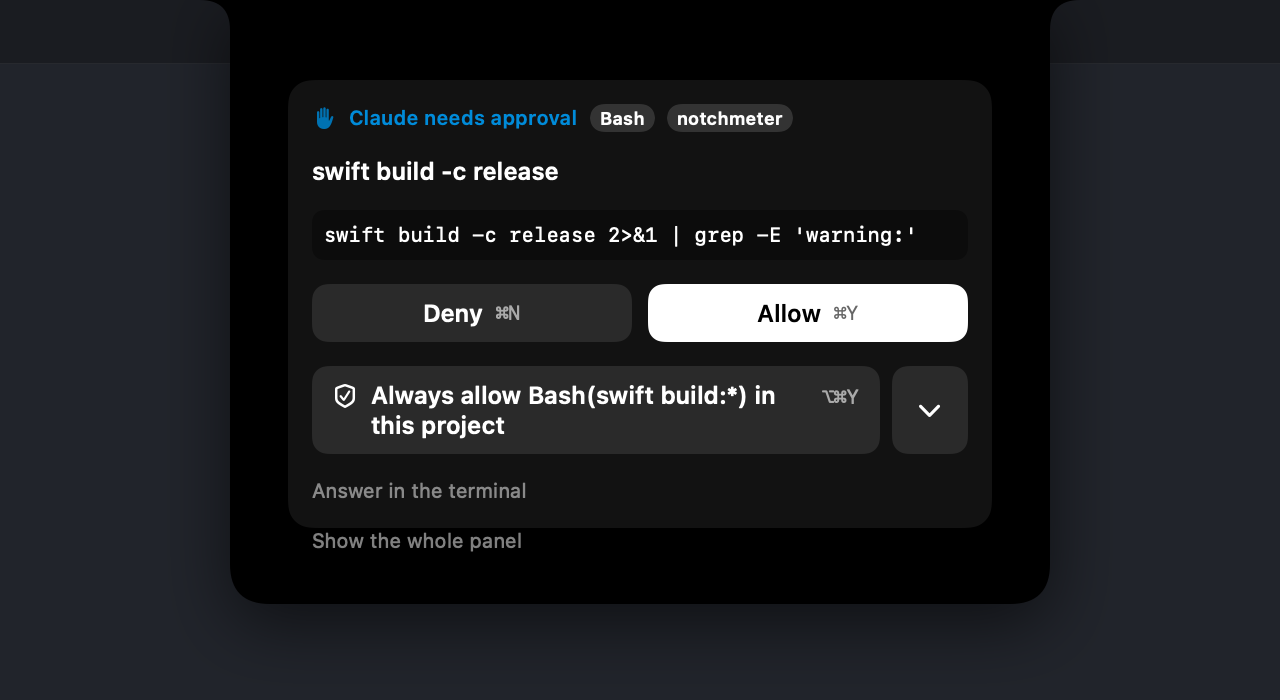
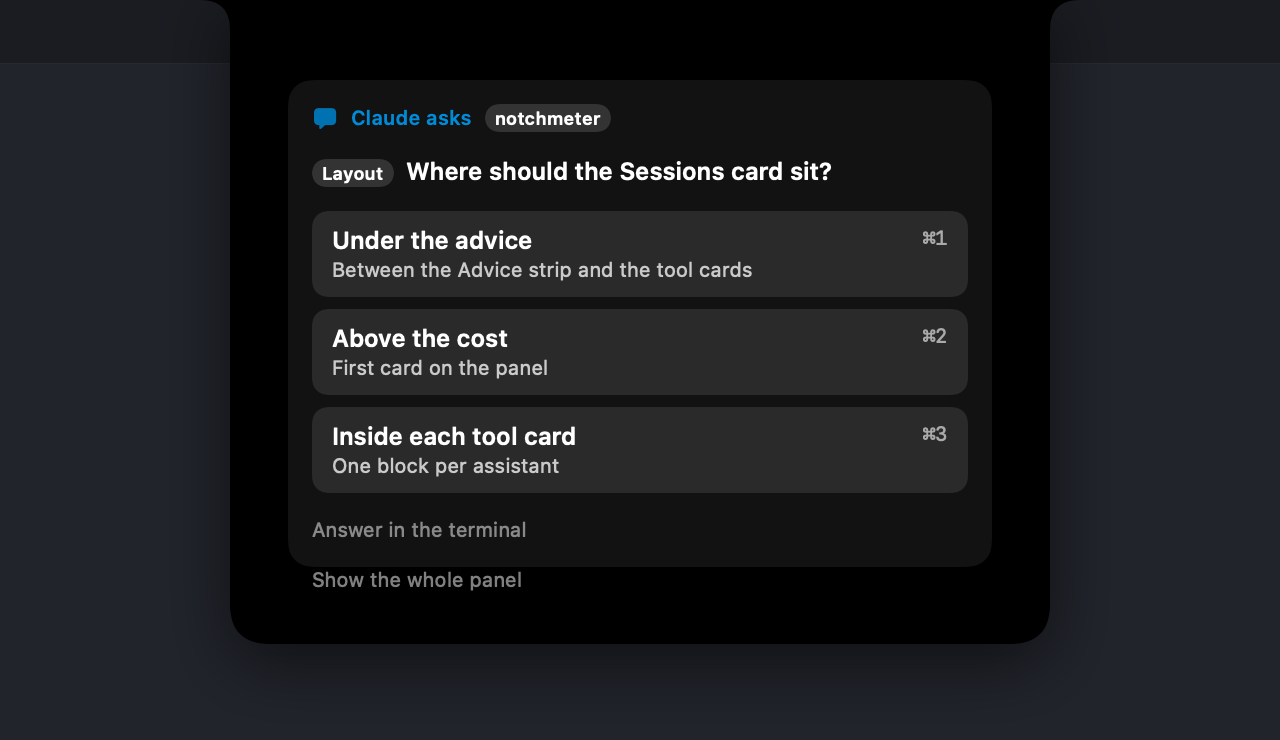
When Claude Code stops for a permission, the panel opens on that request and nothing else: what the tool wants to do, an excerpt of it, and Deny or Allow under your thumb. When it asks a multiple-choice question, you pick the answer the same way. Then the panel closes again and the turn carries on, without a window ever taking your place in the terminal.
Codex and GitHub Copilot CLI answer permission requests the same way, and the card says which of them is asking. Every part of it fails open: hand it back with Answer in the terminal or Escape, let the hold run out, switch it off in Settings, or quit Notchmeter altogether, and the terminal asks exactly as it always has. The card shows what a tool wants to do, never your prompt or the file it is editing.
Cursor is answered there too. With Mirror Cursor's cards on, its own Run prompt and its switch-to-Plan-Mode card open the notch with Cursor's buttons, and a question it asks opens with its choices: pick one, press Continue, and Cursor carries on with your answer. A question asked while Cursor's window is minimised or hidden still reaches the notch, shown with a button that brings Cursor back to answer it.
Notch, or any edge you like
No notch, or you'd rather it lived elsewhere? The left and right edges cut the same notch shape into the side of the screen and open the panel beside it, with the readings still on the glass. There's a bar above the Dock too, and a pill under the menu bar on a notchless Mac.
Beside the notch, the strip fits itself to the room the menu bar actually leaves: it moves aside as the frontmost app's menus grow, and only once both ends have closed in does it drop to plain rings.
Go full screen and it gets out of the way. Not for everything, though: name the apps you want the meters beside, a call or a screen share, and they stay. One shortcut flips it for whatever is full screen right now, which is what you need when a film and a meeting are the same browser window.
The privacy model is the product
Notchmeter never signs in anywhere and never stores a token. It reads the login the vendor's own tool already put on this Mac, makes the one status read that tool itself makes, and passes it on to nobody.
- One status read per tool, on that tool's own saved login
- Reads your local Claude Code transcripts, Codex's session logs and OpenCode's database for the cost figures
- Keeps everything on the Mac it runs on
- Asks for Accessibility only if you set Readouts to Auto or mirror Cursor's cards
- No account, no sign-in, no cloud, no analytics
- Never stores or forwards a token
- Never sends a prompt, a transcript or a project path anywhere
- Never probes an inference endpoint for rate-limit headers
Small enough to forget it's there
Measured on an M5 Pro running macOS 26 with a heavy Claude Code job in the background; the method and every raw number are in docs/energy.md.
of one core over 60 seconds with the panel closed; 0.0% between cost scans.
physical footprint, 77 MB at peak, with 3,868 transcripts on disk.
while the screen is locked, the displays are asleep, or the Mac is.
Questions, answered
Guides to the questions people ask at the moment they matter, each dated, stamped with the version it was tested on, and linked to the rule behind every figure.
Install it
macOS 15 Sequoia or later, Apple silicon or Intel. Signed, notarised, and it updates itself.
Notchmeter is a Mac app that lives in the notch. There is no Windows version. If you want one, say so on the Windows issue; subscribe to it and GitHub will tell you if that changes.
Free forever, MIT licensed. If it earns its place in your notch, support the project.
Notchmeter is a Mac app. There is no Windows or Linux version; if you want a Windows one, the Windows issue is where to say so.