
An AI usage tracker for the Mac, in the notch
Notchmeter is a free, open-source Mac app that meters eight AI coding tools, Claude Code, Codex, Cursor, Gemini CLI, Antigravity, GitHub Copilot, Kimi Code and OpenCode, beside the MacBook notch or on any screen edge. Every meter has a pace tick, a projection and its reset; an Advice strip says what to do about the number; and every figure is sourced, dated and tested, with the rule behind it written down in docs/accuracy.md. It never signs in anywhere, never stores a token and keeps no server.
macOS 15 or later · Apple silicon or Intel · no account, ever
Claude Code, Codex, Cursor, Gemini CLI, Antigravity, Copilot, Kimi Code and OpenCode, on one strip.
No account, no token stored, nothing sent to a server of ours.
Measured under a heavy job. Nothing at all while the screen is locked.
MIT licensed. Build it yourself if you'd rather.
One meter per tool, read from the tool that owns the account
Each reading is borrowed from the assistant itself, on the login that assistant already keeps on your Mac. Switch accounts in the tool and the notch follows.
Claude Code
The 5-hour session window, the weekly window and the per-model weekly limits, plus what your local sessions would have cost at API list prices.
How it meters Claude CodeCodex
The session, weekly or monthly windows from the same backend Codex itself asks, and this Mac's sessions priced at OpenAI's published rates.
How it meters CodexCursor
Included plan usage and on-demand spend for the billing cycle, read the way cursor.com's own dashboard reads it, and the export's own costs.
How it meters CursorGemini CLI
The per-model quota Google meters for Gemini CLI, from the Code Assist endpoints its own /stats reads, asked as Gemini CLI.
How it meters Gemini CLIAntigravity
The session and weekly quota Antigravity's own panel shows for its model groups, asked as Antigravity, so it can differ from Gemini CLI's on the same Google account.
How it meters AntigravityGitHub Copilot
The month's AI-credit allowance on a seat GitHub bills by usage, or a legacy seat's premium requests, from the endpoint Copilot's own plugin asks.
How it meters CopilotKimi Code
The rolling five-hour window, the week and the monthly pools, from the endpoint Kimi Code's own /usage command reads; where Kimi's two kinds of figure disagree about a window, the further-along one is shown.
OpenCode
The OpenCode Go meter, computed on this Mac from OpenCode's own database at the Go page's published rates and limits, its spend on the Cost card and its sessions, with no request to anyone.
How it meters OpenCode, in docs/accuracy.mdWhen a limit resets
The reset as a countdown or an exact time, whether you will run out before it, and a notification when the window comes back.
When the Claude Code limit resetsThe whole picture, on hover
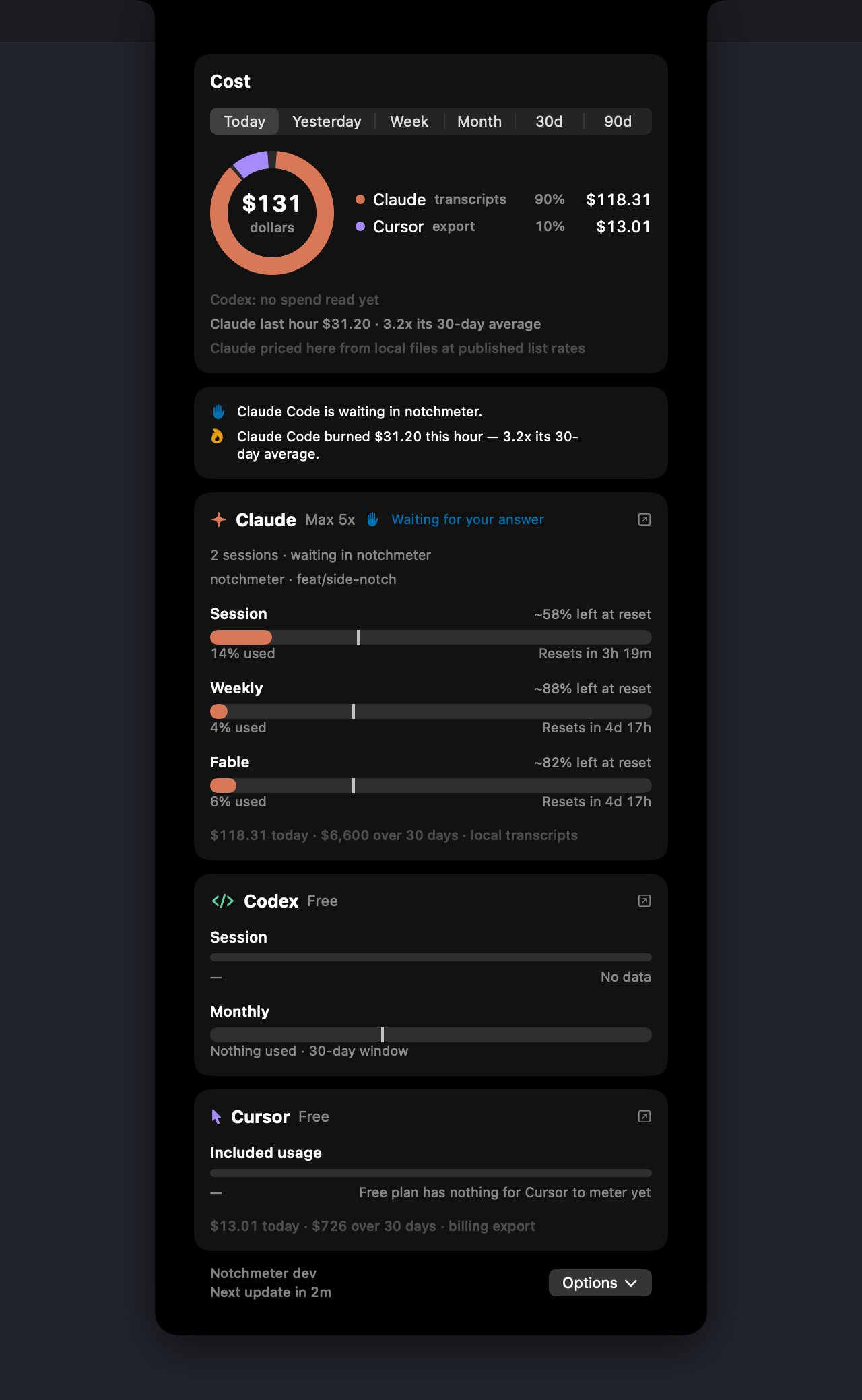
Every meter shows a pace tick, where an even burn would be right now, a projection (“~67% left at reset” or “Runs out in 2h”) and the reset as a countdown or an exact time. A week is projected at how far it rose over the last day, nights and breaks included, so a week spent on its first night and quiet since does not read as running out. The Cost card adds what your local Claude Code, Codex and OpenCode sessions would have cost at API list prices, and the dollars Cursor and GitHub Copilot themselves put on the month.
The advice, on the row each line is about (or as a strip under it in the Detailed layout), is worded as an instruction rather than a percentage: Opus weekly is 91%. Sonnet is 34%. Switch models, not tools. The rules are pure functions over every visible tool's live reading, and each is pinned by a test.
Press ⌘U for the Usage Dashboard: the week's spend by day and by assistant, with a day's figures in a tip under the pointer and any days you click pinned side by side, every limit with how much a day lasts to its reset, and where the money went by model and by project.
The privacy model is the product
Notchmeter never signs in anywhere and never stores a token. It reads the login the vendor's own tool already put on this Mac, makes the one status read that tool itself makes, and passes it on to nobody.
What it does
- One status read per tool, on that tool's own saved login
- Reads your local Claude Code transcripts, Codex rollouts and OpenCode's database for the cost figures
- Keeps everything on the Mac it runs on
- Asks for Accessibility only if you set Readouts to Auto
What it never does
- No account, no sign-in, no cloud, no analytics
- Never stores or forwards a token
- Never sends a prompt, a transcript or a project path anywhere
- Never probes an inference endpoint for rate-limit headers
Every request the app makes, what it names itself as, and where it stands against each vendor's terms: Who each request says it is, and the honest rest of it in the privacy policy.
Small enough to forget it's there
Measured on an M5 Pro running macOS 26 with a heavy Claude Code job in the background; the method and every raw number are in docs/energy.md.
of one core over 60 seconds with the panel closed; 0.0% between cost scans.
physical footprint, 77 MB at peak, with 3,868 transcripts on disk.
while the screen is locked, the displays are asleep, or the Mac is.
Questions
Which AI tools does Notchmeter track?
Claude Code, Codex, Cursor, Gemini CLI, Antigravity, GitHub Copilot, Kimi Code and OpenCode: one ring each beside the notch, one card each in the panel, and for most of them a page on this site saying what is shown and where it comes from. Switch off the ones you do not use and the rings give their room to the ones you keep.
Do I need to sign in or create an account?
No. Notchmeter never signs in anywhere. Each reading is borrowed from the tool that owns the account, on the login that tool already keeps on this Mac, in the same read-only status request the tool's own app or dashboard makes. It never refreshes or stores a token and has no server of its own.
Which Macs does it run on?
Any Mac on macOS 15 Sequoia or later, Apple silicon or Intel. On a MacBook with a notch the rings sit beside it; on any other Mac, or if you would rather, the same notch shape is cut into the left or right edge of the screen, there is a bar above the Dock, and a pill under the menu bar. There is no Windows or Linux version.
Is it really free?
Yes. The whole app is free, MIT licensed and open source, with no trial, no locked feature and no nag. You can pay what you want towards it, once, and nothing changes in the app either way.
How accurate are the figures?
The limits are the vendors' own figures, read from the same endpoints the vendors' own apps read, and every window says whose figure it is. The costs are estimates whose rules are written down with their sources and dates in docs/accuracy.md, pinned by a golden-transcript test suite; a tool whose spend cannot be honestly derived has no cost row rather than a $0. Notchmeter does not show a number it cannot show its work for.
What does it cost to run?
On an M5 Pro with a heavy Claude Code job in the background: 1.4% of one core over 60 seconds with the panel closed, 0.0% between cost scans, a 63 MB physical footprint, and nothing at all while the screen is locked, the displays are asleep or the Mac is. The method and the raw numbers are in docs/energy.md.
Install it
macOS 15 Sequoia or later, Apple silicon or Intel. Signed, notarised, and it updates itself. Free forever, MIT licensed.
Notchmeter is a Mac app. There is no Windows or Linux version; if you want a Windows one, the Windows issue is where to say so. How every figure is built, with its source and its date: docs/accuracy.md.